Problem:
If you have any Movicon Windows Services Running (IO Data & WebHMI) you cannot Deploy changes to your project.
When you attempt to deploy (SVG) you will see the progress bar, and it appears to be successful, but your project changes will not go through.
Solution:
On WebHMI, you cannot Deploy (download) any changes with any Windows services still running.
You must stop ALL IO Data Server & WebHMI Services first.
Think of it as an Emerson PLC and PME, but with no ability to RMS, and no warning that your Download is unsuccessful.
You must -
- Stop ALL Windows Services for any WebClient, WebHMI Client, IO Data Server
- Deploy (Download) your updated Project
- Start the appropriate IO Data Services and Client
Movicon does not tell you if you have Services Running from other projects.
If you have older project Services Running (IO Data & WebHMI) you can Deploy your new project all you want – you won’t see any changes in your browser.
In this screen snip, the Services Running are:
- Demo IO Data Server
- Custom WebHMI project
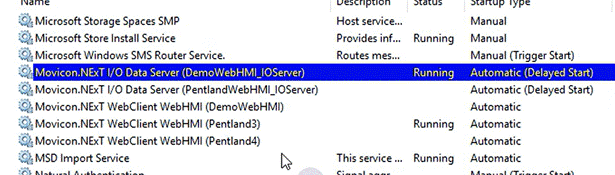
Since the Custom WebHMI project is not configured to use the data from Demo IO Data Server, not values would display.
Also, any attempts to change the WebHMI objects would not take because it's Service must be Stopped first.
Once we stopped the WebHMI service and IO Data Server
We deployed (SVG) the Demo project and started the 2 services in Movicon's Service Manager.
Then we had a fully functional Demo project.
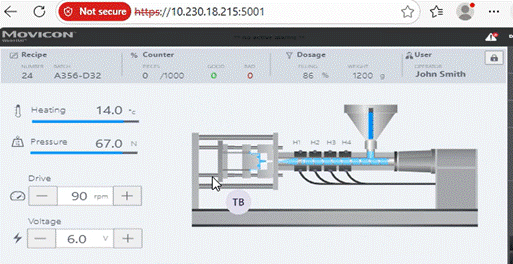
Then, we stopped the Demo project IO Data & WebHMI, closed out of the project, opened the custom project, deployed (SVG), started both services, and it worked perfectly.
Open Question:
Is “Multi-Session” the Server add-on that allows multiple IO Data Servers to run?
Was this article helpful?
That’s Great!
Thank you for your feedback
Sorry! We couldn't be helpful
Thank you for your feedback
Feedback sent
We appreciate your effort and will try to fix the article